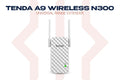
The Tenda A9 is a compact N300 Wi-Fi range extender that boosts your existing router's signal into dead zones. Plug it in, press the one-button extension, and you're connected. Available at TechDukan.pk.
Where You'll Use This
- 🛏️ Bedroom with weak Wi-Fi upstairs — router downstairs but signal dies out by the time it reaches your room? This fixes it
- 🌳 Lawn or outdoor sitting area — get usable Wi-Fi outside on the lawn or terrace where the router signal doesn't reach
- 📦 Store room or basement — extend coverage to a back room, storage area, or basement office
- 🏢 Second floor of a house or shop — common in Pakistani homes where thick concrete floors block the signal from reaching upstairs
- 📶 Any known dead spot — that one corner of the house or office where your phone always shows "no internet"
Key Features
- ✅ 300Mbps N300 Wi-Fi — extends your existing 2.4GHz signal
- ✅ One-Button Extension — connects in seconds via WPS
- ✅ Universal Compatibility — works with any router brand
- ✅ Wall-Plug Design — no desk space needed
- ✅ Smart Signal LED — helps you find the right placement spot
Specifications
| Specification |
Detail |
| Speed |
N300 (300Mbps 2.4GHz) |
| Antennas |
2× external 3dBi + 2× internal |
| Design |
Wall-plug |
📦 What's in the Box
📡
Range Extender × 1
📖
Quick Start Guide × 1
🛒 Why Buy from TechDukan.pk?✅ 100% Original — Official Authorized Dealer
🚚 Cash on Delivery Nationwide
🛡️ Official Warranty
📲 WhatsApp:
+92 322 8218388
Frequently Asked Questions
Where should I place the A9 in my home for best results? ⌄
Place the A9 halfway between your router and the area with weak signal — not too close to the router and not in the dead zone itself. The smart signal LED shows how well it's receiving your router; if it shows a weak signal, move it closer. In a two-storey Pakistani home, the top of the staircase or the first floor landing usually works well.
Will the A9 work with my existing Tenda, TP-Link, or Huawei router? ⌄
Yes. The A9 works with any 2.4GHz Wi-Fi router regardless of brand — including Tenda, TP-Link, Huawei, ZTE, and ISP-provided routers from PTCL, StormFiber, or Nayatel.
Does using a range extender slow down my internet speed? ⌄
Single-band extenders like the A9 roughly halve throughput, because the same radio receives and rebroadcasts the signal. For everyday use like WhatsApp, browsing, and streaming on typical plans, it's usually fine. If speed matters, a mesh system like the Tenda nova EX3 loses much less speed, especially with Ethernet between nodes.
How do I set up the A9 without a computer? ⌄
Plug the A9 into a wall outlet near your router, press the WPS button on your router, then press the extension button on the A9 within 2 minutes. They connect automatically. You can also join the A9's own Wi-Fi from your phone and configure it in the browser.
Can I use multiple A9 extenders in the same home? ⌄
Yes, but each A9 should connect to the main router rather than daisy-chaining from another extender — chaining multiplies the speed loss. For large homes, a mesh system like the Tenda nova EX3 is the better option, with seamless roaming between nodes.