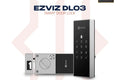
The EZVIZ DL03 is a smart rim lock that brings keyless entry to your door without replacing the whole lock body. Unlock with a passcode or remotely from the EZVIZ app over Wi-Fi. Available at TechDukan.pk Pakistan's authorized EZVIZ dealer.
Where You'll Use This
- 🏢 Apartment / flat door surface-mounted rim lock, simpler to fit than a mortise smart lock
- 🚪 Bedroom door inside the house give your own room a keyless lock without touching the main entrance
- 🏠 Shared house / hostel room secure your room with a passcode instead of a key that can be copied
- 🏬 Office cabin or private room give each person their own code and see who came in
- 🔙 Secondary / back door add smart access to a side entrance while keeping your main door lock as is
Key Features
- ✅ Smart Rim Lock mounts on the door surface with the included template and bracket
- ✅ Passcode Unlocking 6–10 digit codes, up to 50 codes
- ✅ Temporary & Virtual Passcodes give guests access without revealing your code
- ✅ Built-in Wi-Fi no hub needed, connects directly to your router
- ✅ Remote Unlock & Auto-Lock control and check lock status from anywhere
- ✅ Smart Alerts door left open, tamper, wrong-code attempts, low battery
Specifications
| Specification |
Detail |
| Model |
CS-DL03 |
| Lock Type |
Smart Rim Lock |
| Connectivity |
2.4GHz Wi-Fi (built-in) |
| Unlock Methods |
Passcode, temporary passcode, virtual passcode, remote app unlock |
| Power |
4× AA batteries (included) |
| Material |
Aluminum + plastic, -25°C to 55°C |
📦 What's in the Box
🔒
Front & Rear Panels
🔧
Mounting Bracket × 1
📦
Door Buckle Box × 1
🔋
AA Batteries × 4
🔩
Screw Kit × 1
📋
Hole Template × 1
📖
Quick Start Guide × 1
🛒 Why Buy from TechDukan.pk?✅ 100% Original Official Authorized Dealer in Pakistan
🚚 Cash on Delivery Available Nationwide
🛡️ Official Warranty Included on Every Purchase
📦 Fast Delivery 2 to 5 Business Days
📲 WhatsApp Support:
+92 322 8218388
🛡️ Official EZVIZ Warranty
This product carries a straight 2-year official warranty.
🔧 How to Install
- Check your door and current latch; WhatsApp us a photo if you're not sure the DL03 fits.
- Use the included hole template to mark the door for the front and rear panels.
- Fit the mounting bracket and rear panel on the inside of the door, then the front panel outside, using the included screws.
- Fit the door buckle box on the frame, using the gaskets to adjust alignment.
- Insert the 4 included AA batteries.
- Download the EZVIZ app, scan the QR code on the lock, and connect it to your 2.4GHz Wi-Fi.
- Set your passcodes in the app and test every method before relying on it as your only way in.
✅ Installation Do's and Don'ts
- ✅ Do test the Wi-Fi signal strength at the door before finalizing installation
- ✅ Do set at least two passcodes so you're never locked out
- ✅ Do replace batteries as soon as you get the low-battery alert
- ❌ Don't use old, weak, or mismatched batteries; use fresh AA batteries from the same batch
- ❌ Don't share your main passcode with guests; send a temporary code instead
Frequently Asked Questions
Does the DL03 have a fingerprint scanner or card reader? ⌄
No. The DL03 unlocks with passcodes and the EZVIZ app. For fingerprint and card unlocking, see the EZVIZ DL05; for face recognition, the DL50FVS.
What is a rim lock and is it different from a mortise lock? ⌄
A rim lock mounts on the surface of the door rather than inside it, so it's simpler to fit than a mortise lock, which needs a pocket cut into the door edge. You still need to drill a few holes using the included template.
Can I give temporary access to guests? ⌄
Yes. Create temporary passcodes in the EZVIZ app and delete them whenever you want.
How many codes can be added? ⌄
Up to 50 passcodes, managed through the EZVIZ app, where you can add or delete users individually.