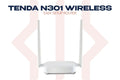
The Tenda N301 is a reliable N300 wireless router built for everyday home internet. Simple 3-step setup, stable connection, and solid coverage for apartments and small homes. Available at TechDukan.pk.
Where You'll Use This
- 🏠 Small apartment or flat — enough coverage for a 1–2 bedroom home without dead zones
- 🔧 Replacing an old or broken router — swap out your ISP's basic router for something more reliable in minutes
- 📚 Single room setup — a hostel room, study room, or shop counter that just needs solid internet
- 👨👩👧 First-time home Wi-Fi setup — simple 3-step process, ideal if you've never configured a router before
- 🏡 Guest house or spare room — an affordable, easy-to-manage Wi-Fi solution for a secondary space
Key Features
- ✅ N300 Wi-Fi Speed — 300Mbps for everyday browsing and streaming
- ✅ 3-Step Easy Setup — connect, open browser, done
- ✅ 2× External Antennas (5dBi) — stable signal throughout the home
- ✅ Universal Compatibility — works with any ISP in Pakistan
- ✅ Guest Network — separate Wi-Fi for guests without sharing your password
Specifications
| Specification |
Detail |
| Standard |
IEEE 802.11b/g/n |
| Speed |
300Mbps (2.4GHz) |
| Antennas |
2× 5dBi external |
| Ports |
1× WAN + 3× LAN (100Mbps) |
| WPS |
Yes |
📦 What's in the Box
📡
Router × 1
🔌
Power Adapter × 1
🔗
Ethernet Cable × 1
📖
Quick Start Guide × 1
🛒 Why Buy from TechDukan.pk?✅ 100% Original — Official Authorized Dealer in Pakistan
🚚 Cash on Delivery — Available Nationwide
🛡️ Official Warranty Included on Every Purchase
📦 Fast Delivery — 2 to 5 Business Days
📲 WhatsApp Support:
+92 322 8218388
Frequently Asked Questions
Will the Tenda N301 work with my PTCL, StormFiber, or Nayatel connection? ⌄
Yes. The N301 is compatible with all major Pakistani ISPs including PTCL, StormFiber, Nayatel, FiberNation, and others. It supports both ADSL and fiber (FTTH) connections and works with any standard modem or ONT provided by your ISP. Simply connect your ISP's cable to the WAN port and follow the 3-step setup.
Is 300Mbps enough for a household in Pakistan? ⌄
For most Pakistani home users with internet plans up to 50–100Mbps, the N301 is more than sufficient. It handles simultaneous browsing, WhatsApp, YouTube streaming, and light gaming comfortably. If your internet plan exceeds 100Mbps or you have many simultaneous users, consider upgrading to the Tenda AC5 dual-band router for better performance.
How do I set up the N301 without a CD or app? ⌄
Setup is done entirely through a web browser — no CD or app needed. Connect your device to the router via Wi-Fi or Ethernet cable, then open any browser and go to 192.168.0.1. The setup wizard will guide you through selecting your connection type and setting your Wi-Fi password in under 5 minutes.
Can I use the N301 as a repeater or access point? ⌄
Yes. The N301 supports multiple modes including router mode, repeater/range extender mode, and access point mode. In repeater mode it can extend your existing Wi-Fi signal to areas with weak coverage. In access point mode it can be connected to a wired network to add wireless capability to a room or floor.
Does the N301 support parental controls or device blocking? ⌄
Yes. The N301's web interface includes basic parental control features including URL filtering to block specific websites, MAC address filtering to block specific devices from connecting, and access scheduling to restrict internet access during certain hours. These are configured through the admin panel at 192.168.0.1.